Create. Send. Get paid. Sorted.

A GST invoice in 30 seconds.
Paid without the chasing.

Create it in the builder or ask Maya AI; Maya AI handles the follow-ups on WhatsApp and email.

30sto create GST-compliantalways Auto follow-upsWhatsApp + email Multi-currencyexports

Everything an invoice needs. Handled.

From the first draft to the final rupee, built for independents.

Two ways to create

Build it line by line in the invoice builder, or tell Maya what you want.

GST-compliant by default

SAC codes, per-line GST rates and the CGST/SGST/IGST split, worked out from you and your client.

A real invoice lifecycle

Draft, proforma, issued, with one-tap conversion to a tax invoice and duplication of any past invoice.

Your numbering, your brand

Run your own invoice series with live uniqueness validation, a custom PDF template and your digital signature.

Export invoices, sorted

Any currency, live conversion to INR, and the LUT declaration added automatically, pairing with your International Account.

Recurring invoices & retainers

Set any frequency and invoices generate themselves, with a badge showing the next date.

From "send an invoice"
to sent.

Tell Maya "Send AdTech Pvt. Ltd. a ₹50,000 invoice due the 15th", or build it line by line in the invoice builder.

  • Maya drafts it from one line. You review and confirm
  • CGST/SGST/IGST split worked out per line, automatically
  • Your series and numbering, validated live for uniqueness
  • Professional PDF with your template and digital signature
Meet Maya, your AI financial assistant
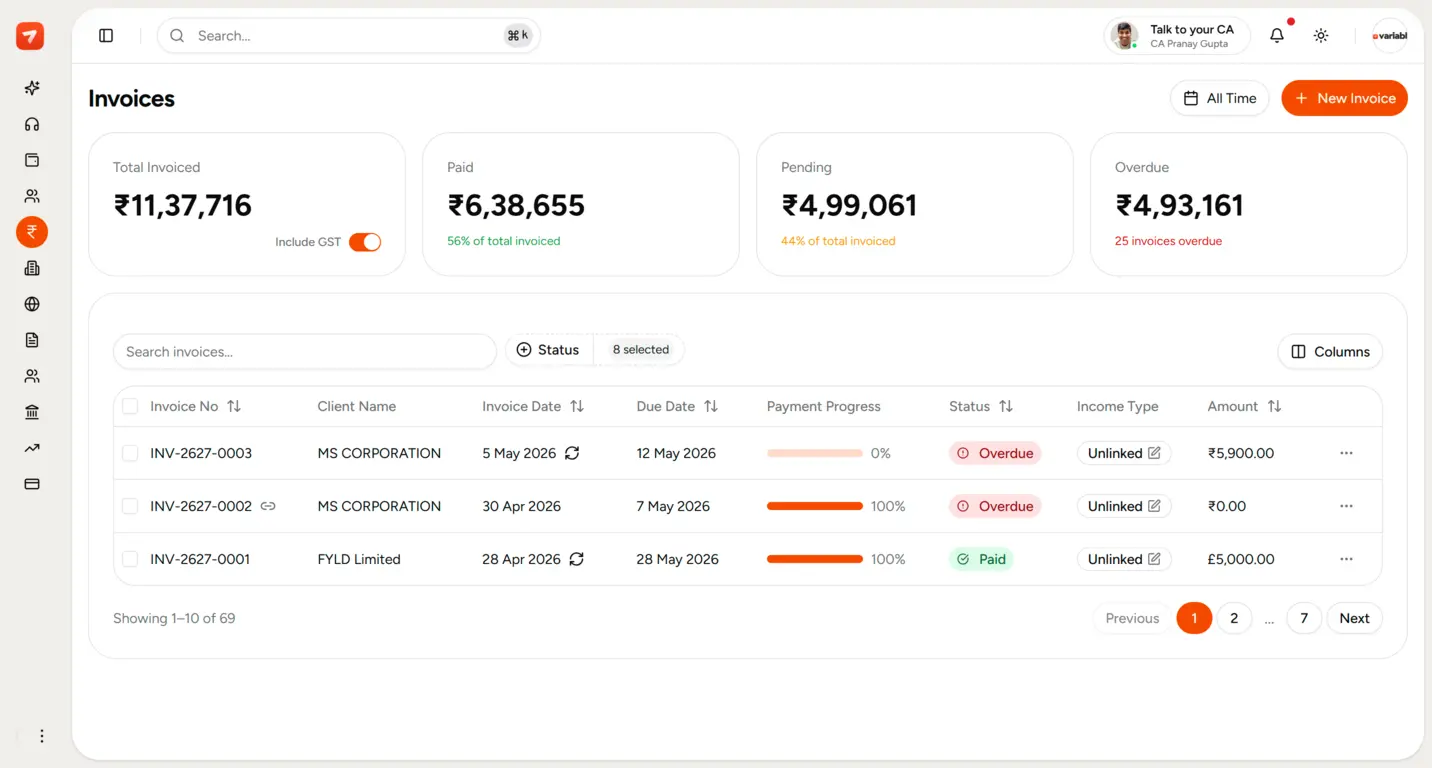
The Variabl invoicing dashboard: GST-compliant invoices with statuses, payments and follow-ups
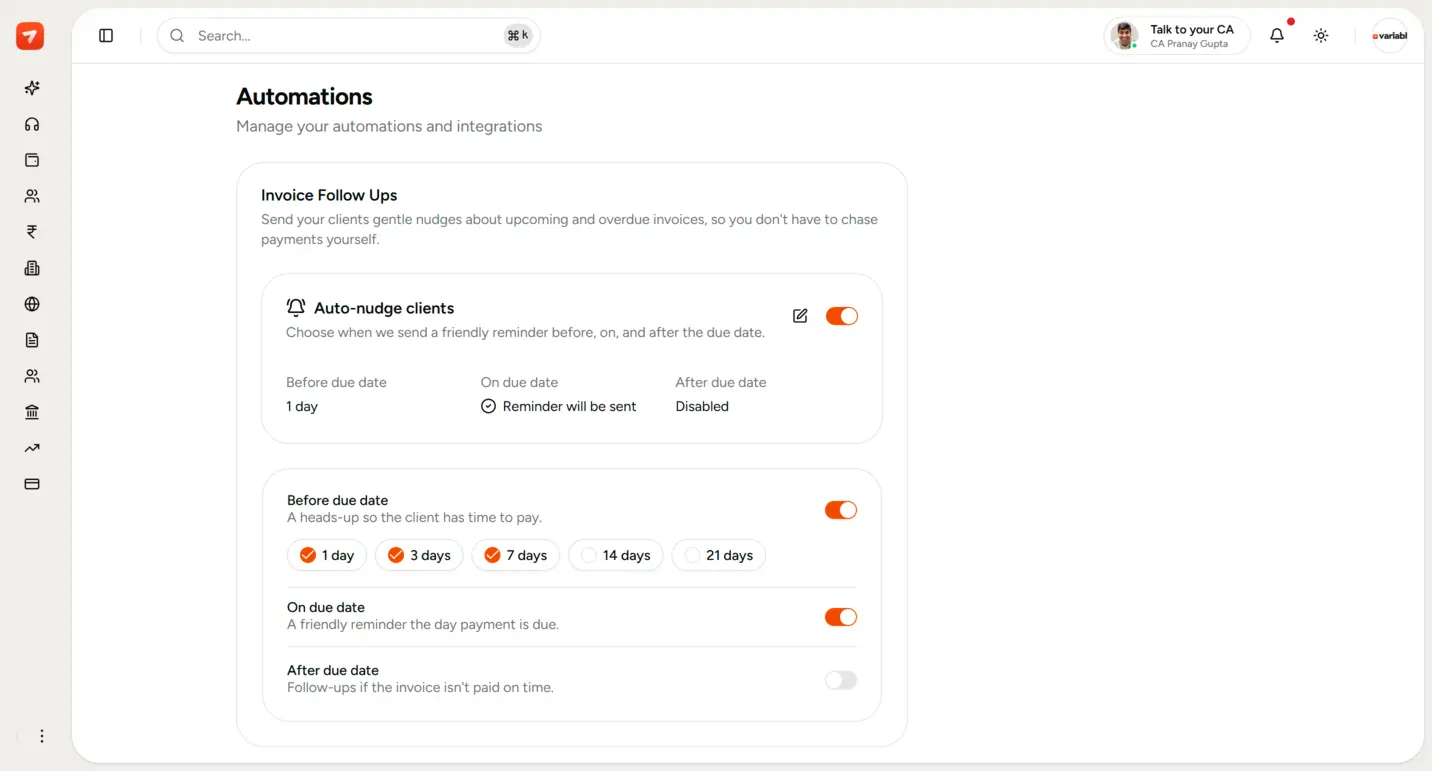
Variabl automations: payment reminders scheduled over WhatsApp and email

Follow-ups · INV-0042

AdTech Pvt. Ltd. · ₹50,000

On autopilot
  1. 3 days before due

    WhatsApp Email Sent ✓
  2. On the due day

    WhatsApp Email Sent ✓
  3. 1 day after

    WhatsApp Email Scheduled
  4. 7 days after

    Polite nudge, both channels

  5. 14 days after

    Final reminder, both channels

Maya AI handles the chasing for you.

You send the work.
Maya AI handles the chasing.

Polite, well-timed reminders go out over WhatsApp and email, so you never write another awkward "checking in on that invoice" message.

  • Manual reminders anytime. One tap when you want to nudge
  • Multi-channel share: editable subject and body, with read receipts
  • Stops the moment it's paid. No reminder ever goes out late

The money lands.
The record takes care of itself.

Record partial or full payments in seconds, capture any TDS the client deducted, and it all flows into your tax records.

  • Partial and full payments, with a progress ring on every invoice
  • TDS withheld, captured and carried into your tax records
  • Forex gain/loss handled on multi-currency invoices
  • Bulk mark-as-paid, plus a full activity timeline per invoice

INV-0038 · Kaveri Studios

₹1,00,000

Partially paid
Received ₹58,500
TDS withheld ₹6,500
Pending ₹35,000

What's TDS? Your client cut this off your payment and sent it to the tax department for you. You can claim it back while filing taxes.

INV-0051 · Brightside LLC

$2,400

Export
Live conversion ≈ ₹2,00,160 @ ₹83.40/USD

Declaration · added automatically

"Supply meant for export under LUT without payment of integrated tax."

Heads up: your LUT for this financial year isn't on file yet. We'll register it for you

Invoicing a client abroad?
Already sorted.

Invoice in USD, EUR or any currency, with live FX conversion to INR on the invoice itself.

Know what's sent, what's paid, and what's pending, at a glance.

Your invoice dashboard adds it all up, with date-range filters for any period you care about.

This month This quarter FY 2025–26 Custom range

Total invoiced

₹12,40,000

Paid (incl. TDS)

₹8,10,500

Pending

₹3,05,000

Overdue

₹1,24,500

Statuses that match reality: Paid Partially paid Pending Overdue Cancelled Written-off

Frequently asked questions

Everything about creating, sending and getting paid on your invoices with Variabl.

How fast can I create an invoice?

About 30 seconds. Use the invoice builder, or tell Maya what you want: "Send AdTech Pvt. Ltd. a ₹50,000 invoice due the 15th." Maya drafts it with your template, numbering and digital signature. You confirm, it's issued.

Are Variabl invoices GST-compliant?

Yes, by default. SAC codes, per-line GST rates and the CGST/SGST/IGST split are worked out automatically based on you and your client. If you're not registered under GST, you see none of that complexity. Your invoices stay clean.

Can I invoice international clients in USD?

Yes. Invoice in USD, EUR or any currency, with live conversion to INR. The LUT declaration is inserted automatically on export invoices, and Variabl nudges you if your LUT for the financial year is missing. Pair it with a Variabl International Account to receive the payment at the Google rate.

Does Variabl follow up on unpaid invoices?

Yes. Polite reminders go out over WhatsApp and email: 3 days before the due date, on the due day, and 1, 7 and 14 days after. Maya AI handles the chasing for you. You can also send a manual reminder anytime, with an editable subject and body, and read receipts so you know it was seen.

Can I set up recurring invoices or retainers?

Yes. Set any frequency: monthly, every N weeks or days. Invoices generate themselves, with a badge showing the next date. Need one early? Generate the next one now. Retainer ended? Stop anytime.

What happens when a client deducts TDS?

Record the TDS withheld while marking the invoice paid. Your client cut this off your payment and sent it to the tax department for you. You can claim it back while filing taxes. Variabl counts it in your paid total and carries it into your tax records.

Can I use my own invoice numbering and branding?

Yes. Run your own invoice series with live uniqueness validation, pick a custom PDF template, and add your digital signature. Every invoice goes out looking like yours, not ours.

Can I send a proforma invoice first?

Yes. Every invoice moves through a real lifecycle: draft, proforma, issued. Send a proforma for approval, convert it to a tax invoice in one tap when the client confirms, or duplicate any past invoice to start a new one.

How do I know what's paid and what's pending?

Your invoice dashboard shows Total invoiced, Paid (including TDS), Pending and Overdue, with date-range filters. Statuses match reality: paid, partially paid, pending, overdue, cancelled and written-off, with a payment progress ring and full activity timeline on every invoice.

Is there a free plan?

Yes. The Starter plan is free forever and includes 5 invoices a month. Paid plans give you unlimited invoices, and Plus is free for your first 6 months on the launch offer. No credit card needed to sign up.

Your next invoice is
one sentence away.

On your template, and tax-ready from the moment you hit send.

Free on Starter: 5 invoices a month · Plus free for 6 months at launch · No credit card needed