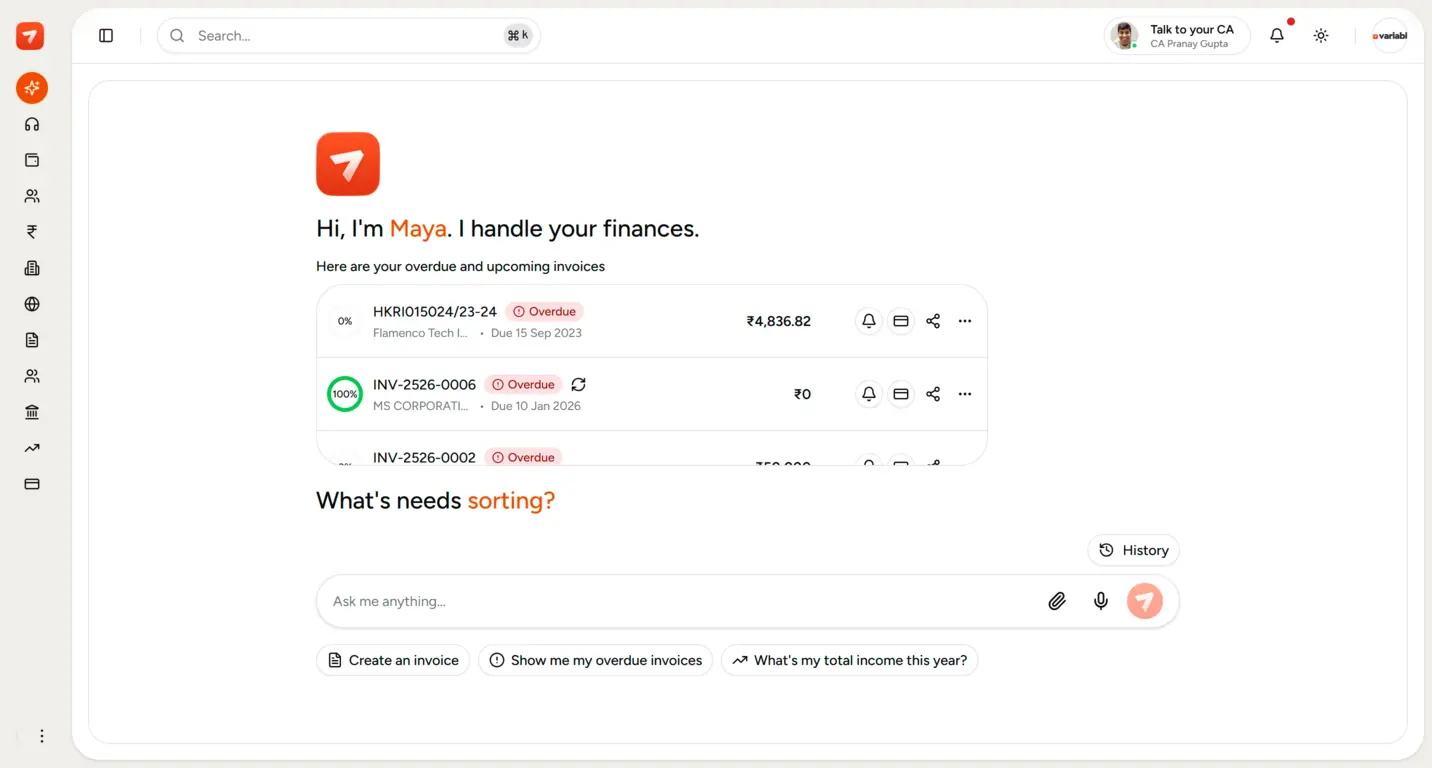
Not a chatbot bolted onto an app. Maya AI is the layer of Variabl that does the work: she sits at the centre of your money and acts on it, while your dedicated CA, included with Variabl, verifies and signs off.
Invoices, in one message
Say the client, amount and due date. Maya drafts, you confirm, it's issued.
Answers from your real numbers
"What's my revenue this month?" Answered from your real data, in plain language.
She doesn't stop at answers
Payments chased and recorded, reminders sent, deadlines flagged before they become problems.
Talk, type, or attach
Speak the invoice or attach a PDF: Maya turns it into a draft. No retyping.
Your dashboard, curated by Maya
Income, a 3-month projection, invoice status and overdue alerts, arranged for you.
Your week, as a voice note
A weekly audio recap of your money, with a full text transcript alongside.
One message. One issued invoice.
You review, confirm, and it's issued. About 30 seconds, start to finish.
Your payment methods, signature and PDF template, applied automatically
Create a monthly ₹50,000 invoice for AdTech Pvt. Ltd. Due the 15th.
Drafted. Take a look. Confirm and it's issued.
Invoice draft
Monthly
AdTech Pvt. Ltd.
₹50,000
Due the 15th
Payment methods · Signature · Your PDF template, applied
Confirm & issueEdit
ShareRecord paymentMake recurringDuplicate
She knows your whole business.
You don't explain your business to Maya. You ask about it.
"Show me my overdue invoices": listed, reminders one tap away
"What's my revenue this month?" "What's my cash flow?" Answered from your records
"What are my tax obligations?" Deadlines tracked, your GST and tax numbers kept filing-ready
Needs a professional? Maya hands you to your dedicated CA in one tap
Talk to her. Or let her talk to you.
Type it, say it, or attach it. Once a week, she sends the update herself.
Voice dictation built in: speak the invoice, she drafts it
Attach an invoice PDF and she extracts the details into a draft
Every conversation saved, searchable and renameable
When is my next tax payment due?
March 15th. I'll remind you 3 days before. Consider it handled.
Weekly summary · Voice note
Your week, in 90 seconds
2 payments in · 3 invoices out · 1 pending, transcript below
Privacy & security
Full context. Not full exposure.
Maya works with your whole business, while the data that should never leave, never leaves.
Sensitive data stays out of AI
Your PAN, Aadhaar, bank details and ID documents are never sent to any AI provider. Full stop.
Encrypted everywhere
Your data is encrypted in transit and at rest, protected at every layer.
Hosted in India
Your financial data lives on servers in India, built for Indian compliance.
You confirm, she issues
Maya drafts and proposes. An invoice goes out only after you've reviewed and confirmed it.
Frequently askedquestions
Everything about Maya, the AI financial assistant at the centre of Variabl.
What can Maya actually do?
Maya creates invoices from a single chat or voice message, answers questions from your real business data: revenue, overdue invoices, top clients, cash flow, tax obligations. She also sends payment reminders, records payments, tracks deadlines, extracts details from invoice PDFs, curates your dashboard, and records a weekly voice-note recap of your money.
Can Maya create and send invoices?
Yes. Describe the invoice in chat: client, amount, due date. Maya drafts it as an interactive card with your payment methods, signature and PDF template already applied. You review, confirm, and it's issued. From the same card you can share it, record a payment, make it recurring or duplicate it.
Does Maya work with voice?
Yes. Voice dictation is built in. Speak instead of typing and Maya takes it from there. She also talks back: every week she records an audio recap of your money, with a full text transcript alongside it.
Can Maya read an invoice PDF?
Yes. Attach an invoice PDF in chat and Maya extracts the details into a draft invoice: client, line items, amounts, dates. No retyping.
Will Maya answer tax questions?
Yes. Ask "What are my tax obligations?" and Maya answers from your real income and invoice data. Deadlines tracked, reminders set. When a question needs a professional, she hands you to your dedicated CA in one tap.
Is my financial data safe with AI?
Yes. Your PAN, Aadhaar, bank details and ID documents are never sent to any AI provider. Your data is encrypted in transit and at rest, and hosted in India.
Does Maya keep my chat history?
Yes. Every conversation is saved, searchable and renameable, so the invoice you created in March, and the chat that created it, are always one search away.
Is Maya included in the free plan?
Maya is available in a limited form on the Starter plan, and in full on Plus and above. See pricing.
Can Maya replace my CA?
No, and she's not meant to. Maya preps and acts: drafts, reminders, records, deadlines. A real CA reviews and signs off on your filings. That's the Variabl model: software tracks, Maya AI acts, your CA signs.
Say it. Maya handles it.
Invoices from a message, payments chased, answers from your real numbers, and your records kept compliant and filing-ready. Your CA verifies and signs off.


 Maya AI · The home screen of Variabl